Saturday, April 25, 2009

Amarok: A Better Media Device Experience, GSoC 2009

So I have again the pleasure of being selected for Google's Summer of Code for Amarok to scratch some very serious itches concerning media device support in Amarok 2.

Itches:

  • Playlist Support
  • More GUI Feedback, more intuitive interface
  • UMS(Universal Mass Storage) Support

Playlist:

Actually, iPods in Amarok already have their playlists read on connect, but at the time I wrote the code, the code in Amarok for any collection dealing with playlists wasn't at a satisfactory level yet, which I believe it to be now thanks to the work of a few people, in particular I know that Stecchino (Bart) has worked on it.

GUI:

The media devices applet seemed like a good idea at first, but it's terrible from a usability standpoint, and since the PUD (Popup Dropper) removes any possibility of dragging-and-dropping tracks onto it, for instance, it doesn't make much sense to have it.  However, I understand there's plans in the works to redo some of Amarok's GUI, part of which will accomodate the previous functions of this applet, and I'll be taking advantage of that.

UMS Support:

Yes!  I swear it this time.  It turned out that building a new collection-based media devices infrastructure more-or-less from scratch took a lot longer than planned last summer, and I did not get to UMS.  Another reason I've held back on it up until now is that media device support in general is going to get a massive refactoring before GSoC begins, to accomodate for simple adding of support not only of UMS devices, but in the future, other types as well.

Ok, now that the explanations of GSoC are out of the way, I move on to something else.

People with media devices, aside from the above, what is it you would like to see in Amarok for devices?  I can list a few off the top of my head, please list more so that I can prioritize perhaps some time for this summer and beyond.

  • MTP Cover Support
  • iPod stale/orphaned scan support
  • Playlist synching with the local collection

Saturday, February 14, 2009

OpenSolaris, Qt and Game Development

Overview

A group of 3 other people and myself were charged with making a game for a class this trimester, which is essentially a Final Fantasy clone with a few quirks localized to our university. In thinking of a toolkit, I thought to myself "what event-driven toolkit provides a graphics system and paint system complete and robust enough to make this happen?" Naturally Qt came to mind. The professor suggested some Java toolkits, including SWT, but my experiences with SWT have not been at all good, so I decided to give Qt a shot. Another perk of Qt over SWT is how easy it is to learn and use, since my 3 team members are not familiar with it.

After a few days of playing with Qt tutorials on the Graphics framework and studying KDE games code, I had a small but working prototype of one of the modes of our game, where the character explores the scene of a level.


Things to notice that were easy to do:

- Creating a graphics item from a graphic file
- Moving it around
- Having it change form
- Collision detection with walls
- Dragging of the view to see different parts of the scene

Deployment

Before proceeding I had to make sure that the program would run on the target platform of the school servers: SunOS 5.10 (Solaris). Now Qt is a cross-platform toolkit, and binary builds of it are provided for Linux, OS X, and Windows, but not for Solaris (that I could find here).

Having recently installed VirtualBox after hearing lots of good things about it, I decided to give Solaris a spin as a virtual machine. There was a bit of confusion for me at the beginning with so many possible distros to choose from, but luckily since only 2 of them are supported by the KDE Solaris team, that narrowed it down. They prefer using SXCE, so I gave that a shot, but unfortunately some bug where X would show up but then freeze on the live dvd stopped me short (I figured it was an issue of running in a VM or something). Then I tried OpenSolaris 2008.11, which installed fine

Then the problem became that the instructions on the wiki for compiling using OpenSolaris were a bit lacking, a problem I have since mended with some updates based on my experience. After much strife with getting the environment set up just right, compiling was not a big deal, thanks to the awesome efforts of the KDE OpenSolaris team. I ran into some issue with a Qt example not compiling, and hacked it up to fix it, since it didn't much matter, and voila, Qt was on the system, and my previous example in the youtube video worked.

From here, I had a few options (as I saw it):
- build Qt as static, deploy a static binary
- build Qt as shared library, ask school admins to install Qt on servers
- build QtJambi, port to Java, deploy as jar

Since building Qt as static was not supported by the KDE Solaris team, I decided to give QtJambi a shot, and ported my example to Java. Unfortunately the QtJambi build specfile provided didn't work too well, and went into an infinite recursive make loop.

When at last I had almost given up, I discovered that the shared library approach doesn't actually require the system to have Qt installed on it, just that the necessary .so shared object files be deployed with the program itself, and to use a script to launch the program (a script which simply adds current directory to linker path).

A simple ldd resulted in this:


libc.so.1 => /usr/lib/libc.so.1
libQtGui.so.4 => /opt/foss/qt4/lib/libQtGui.so.4
libQtCore.so.4 => /opt/foss/qt4/lib/libQtCore.so.4
libCrun.so.1 => /usr/lib/libCrun.so.1
libm.so.2 => /usr/lib/libm.so.2
libglib-2.0.so.0 => /usr/lib/libglib-2.0.so.0
libpng12.so.0 => /usr/lib/libpng12.so.0
libSM.so.6 => /usr/lib/libSM.so.6
libICE.so.6 => /usr/lib/libICE.so.6
libz.so.1 => /usr/lib/libz.so.1
libXrender.so.1 => /usr/lib/libXrender.so.1
libXrandr.so.2 => /usr/lib/libXrandr.so.2
libXfixes.so.1 => /usr/lib/libXfixes.so.1
libXcursor.so.1 => /usr/lib/libXcursor.so.1
libXinerama.so.1 => /usr/lib/libXinerama.so.1
libfreetype.so.6 => /usr/lib/libfreetype.so.6
libfontconfig.so.1 => /usr/lib/libfontconfig.so.1
libXext.so.0 => /usr/lib/libXext.so.0
libX11.so.4 => /usr/lib/libX11.so.4
libgthread-2.0.so.0 => /usr/lib/libgthread-2.0.so.0
libnsl.so.1 => /lib/libnsl.so.1
libsocket.so.1 => /lib/libsocket.so.1
libexpat.so.1 => /usr/lib/libexpat.so.1
libXau.so.6 => /usr/X11/lib/libXau.so.6
libpthread.so.1 => /lib/libpthread.so.1
libmp.so.2 => /lib/libmp.so.2
libmd.so.1 => /lib/libmd.so.1
libscf.so.1 => /lib/libscf.so.1
libuutil.so.1 => /lib/libuutil.so.1
libgen.so.1 => /lib/libgen.so.1
libXevie.so.1 => /usr/X11/lib/libXevie.so.1
libXss.so.1 => /usr/X11/lib/libXss.so.1


Wow, that's a lot of shared objects! According to the Qt deployment guide though, all of the X libraries could and should be avoided to be packaged. I did end up adding other ones though, one by one, as I saw necessary until the program finally ran without a linker error. The bad news is this blew the total package up to 30 MB or so. Oh well, so be it, it ran!

And now...?

And now the real development can begin. There's only a few weeks to work on it, but that should be plenty. It won't be a terribly fantastic game as a result, but it was an interesting adventure, and more importantly proves the point that Qt is an awesome toolkit, and that there are quite a few options open for deployment.

Thanks to the KDE Solaris team for helping me with getting things building, I'd be nowhere without your help (in particular: szt, [ade], steleman, and trochej thanks a lot guys).

Tuesday, February 10, 2009

Karaoke with Windows (via VirtualBox)


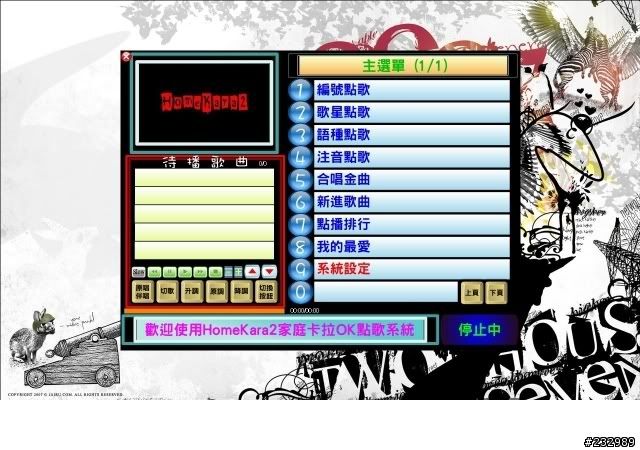
Some time ago, a friend gave me this Chinese karaoke program called HomeKara2, which puts out a song-selection screen to one monitor, and the actual video with lyrics to another. I thought this was nifty, and tried to virtualize it with wine. First, to get Chinese working, I tried this "wineloc" project I used for my Japanese programs. No go. Also, the dual monitor output thing wasn't working. Bummer.

Recently I got hooked up with VirtualBox, a handy replacement for vmware for me, which I've been using for an OpenSolaris machine for developing a Qt game (that's a blog post to come). Somewhere along the line, I set up a Windows XP VM, just to test, and was surprised that it ran quite well, so I decided to put it to the test with HomeKara2.

I ran into some obstacles again, starting with that HomeKara2 has not a UTF-8 codepage, but some Chinese one. I decided to try the good 'ol Microsoft applocale program that changes codepages. This worked amazingly! Until the program crashed randomly and inexplicably at different times. Another problem was that the program uses an external MDB (Microsoft Access Database) file to keep track of the tables of artists, songs, etc, which is not readily editable or even viewable on Linux without extra tools. Last but not least, I had to figure out how to get multiple monitors set up within the virtual machine.

My solutions are out of order of how they happened, but in the order as previously mentioned

The applocale program is apparently quite unstable, and all I had to do to get HomeKara2 to run correctly without it, was to set the default codepage for non-utf8 codepage applications in Control Panel's regional language settings somewhere. This required a quick vm reboot, which was fine.

For the MDB issue, I sought out some freeware editors, which are in general wonderful, but realized that the Windows version of OpenOffice can connect to an MDB file and modify existing tables. A bit fat of a solution to install OpenOffice, but I can't doubt the ease of it.

The multiple monitors issue was a bit tough, but some googling around eventually brought up the right combination of answers. First, shut down the VM if it's running, and start up a terminal.

Note: replace VMNAME with the name for your VM

1. Use the VirtualBox GUI to enable VRDP (remote desktop) and change the port, in case Windows doesn't like you using its default RDP port, and take note of the port.

2. `VBoxManage modifyvm VMNAME -monitorcount 2` will set the number of monitors on the machine to 2.

3. `VBoxManage modifyvm VMNAME -vrdpmulticon on` will allow for multiple connections to the same RDP port. This allows you to connect twice, once for each monitor.

4. Start up your VM as normal, right-click the background wallpaper, click properties, goto settings tab, and select decent sizes for each of your monitors, checking the box for "extend my Windows desktop into this monitor" and apply.

5. Shut down your VM.

6. `VBoxHeadless -s VMNAME` will start your VM in a headless mode (like a daemon) which will listen on the port you specified for RDP connections.

7. Use an RDP program (I use KRDC on KDE), and set up an RDP connection to 'localhost' at your port, i.e. 'localhost:port'. When KRDC asks for extra options, put in '-d @1' and this will connect you to monitor 1 of the VM. Adjust resolution as necessary.

8. Repeat step 7, but change '-d @1' to '-d @2' to connect to the second monitor.

9. KRDC allows you to full-screen each desktop. In my setup, I use nvidia-settings to set up twinview, then put a KRDC instance on each desktop, and fullscreen.

10. Run HomeKara2, and behold the beauty of success.

Notes: be careful with sound forwarding on KRDC, as it might cause an echo. You can just choose to keep sound on "remote only" to fix this.

-- Interesting little other hack --

My friend gave me his music videos by putting them on my iPod, along with the program. I don't have much room left on my laptop's hard drive, so I did something somewhat hackish which actually worked.

1. I mounted the iPod with this long command:

`mount -t vfat -o rw,nosuid,nodev,uhelper=hal,shortname=mixed,uid=1000,utf8 /dev/sdb1 /media/ALEX_IPOD`

The real trick here was the shortname=mixed, which makes sure capitalization is done correctly, and the _long_ vfat names are used. Weird stuff can happen with the default mode on Kubuntu's mounter.

Beforehand, I had set /media/ALEX_IPOD as a shared folder for VirtualBox, so to keep consistency I mounted there again. I then changed the cdrom's drive letter to not D: and assigned D: to a particular folder on the iPod, so that the path lined up perfectly with the path listed in the MDB file for the videos. This worked quite well, so I was able to get away with not modifying the MDB file's path for videos, and with reading all videos directly off the iPod.

-- end hack --

So what did this all look like in the end?


Well OK, later on I fixed the resolutions so that each Windows "monitor" would take up my entire monitor, for both monitors, but this is my setup with my laptop screen and a classic CRT. Not bad for a day's work I'd say, and now I can set up haphazard karaoke when hanging out with friends and there's no place nearby. Nice!

Tuesday, November 4, 2008

Delete Multiple Files

Again, school keeps me busy and away from solving issues, but here's the most recent thing I've been working on.

(Yes, the dialog isn't at all final, I just put it there as a placeholder)

A few collections like the MP3Tunes service, and the local collection, are actually able to delete tracks already! They just... have no GUI to make it all happen. Devices like iPods and MTP devices can delete too, but only one track at a time (far from optimal). So I'm working to bring this ability to all collections alike. Actually getting this working isn't too hard, but making the code nice, understandable and maintainable is a bit of a trick. Luckily I've got a pretty good idea now of how I want it done.

Beta 3 is out =D but still so much left to be done on my end:
- fix MTP track playing, so that the next track properly loads/plays
- add orphaned/stale track checking for iPods
- enhance the Media Devices Applet, and add interface to root item of TreeView for connect/disconnect
- fix cover-related things on iPods (and _possibly_ implement it for MTP devices, by popoular request)

The list goes on, but that's already enough. More manpower for any of these jobs is MORE than welcome. Do apply =)

Monday, October 6, 2008

Media Devices Applet

To control connection/disconnection of media devices, along with advanced functionality such as the stale-and-orphaned feature for iPods in Amarok 1.4, some kind of GUI is needed. One of the discussed long-term ideas is to add functionality into the root item of a treeview, which has its merits in terms of simplicity. However, imagine that you plug in your device, and want to connect to it. The collection would have to be present in a kind of dormant state in the collection browser until you hit connect in the root item. This could work, but it's admittedly odd to have a "dead" collection sitting around.

Since modifying the root item of a treeview was beyond my current knowledge, I wanted to play with plasma a bit, and it gave me more leeway, both in terms of creativity and space, I decided, at least for now, on a Media Devices applet. Some of you may have seen the ghost of this thing in svn and wondered what the dickens it is, so I'll explain to you its current functionality first, and then some of my visions for it.


This first screenshot shows the applet blank since nothing is plugged in (eventually I want it to say "no devices"). Then, for instance, you plug in your iPod (and for now, mount it outside of Amarok) and bam!


Notice a row has been added for the iPod, representing an icon for what the device is, a connect button, a disconnect button, and its mount point. Then you click the connect button and...

You guessed it, it connects (notice the iPod collection on the left). After this, you can work with it like usual, or click the disconnect button and the collection will poof away back to things as you see them in the 2nd screenshot, allowing you to eject the iPod.

The Obvious:

- This is what I would call alpha. Yes, the icons are a bit inappropriate and admittedly borrowed, but I'm sure I can get someone magnificent to create beautiful specialized icons later on (*wink wink*)
- There are still advanced features missing (like showing battery % etc.), but again, this can come later without much trouble once the base concept gets off the ground
- Usability! How will people know to go open the media devices applet the first time they try out Amarok with their device? I'm thinking to have the applet open itself on detecting a compatible device for the first time and getting focus to get the user's attention

The Vision:

So back to the stale and orphaned concept. In 1.4, you had to look at orphaned/stale tracks along with your "normal" tracks in the media browser. Now, you could have a scrollable list each of the stale and orphaned tracks, with the same functionality as before, but now it's not in your way! You can continue to browse through your iPod tracks and the orphaned/stale tracks at the same time.

The conclusion:

Well this all sounds quite well and dandy, but if I have a good idea of how this is going to work, and basic functionality for connect/disconnect is already implemented on my personal box, why don't I commit and get all the rest of the bells and whistles going? The same lame excuse: life is busy. Also I'd like to commit it in a slightly prettier more usable form with less of the obvious bugs in there.

That said, if anyone out there wants to help out with this, let me know, and I can even guide you through the code to get you going. For now though, I'll chug away at it in my spare hours.

Monday, August 25, 2008

"Absence," Akademy and Devices

So I apparently haven't blogged in a month. Sorry about that, it's not that I have nothing to say, just that I'm usually busy doing that I don't really take the time to talk about it. That said, I'll still keep this short as I myself like to read short blurbs from people who aren't well-known.

Akademy. Awesome. Of course I got to meet a good amount of the Amarok people I often talk to, which was the highlight of the trip for me really. It's one thing to discuss over IRC, and quite another to have breakfast together, chat about things non-Amarok as well as Amarok in person, and in general hang out. I also got to meet a lot of other people, like Will Stephenson who donated an MTP device for development (who I met while waiting in the waffles line) [p.s. thank you so much again for it].

Most exciting stuff non-Amarok: Gallium3D... just wow, that's all I can say. Step was pretty awesome too, though my physics is really bad. Marble is exciting stuff, but in Openstreetmap there remains much to be mapped so it may be a while before it becomes truly amazing. There's more, but these are the ones that stuck out most in my mind right now.

So, Media Device Status Report. As you can see, I haven't blogged so obviously nothing has happened. Lies. MTP playing off the device is now supported, a bunch of random bugs have been fixed, and an applet is under way to deal with configuration etc. of devices. Don't worry, this is only for connect/disconnect and options and whatnot, the configuration of devices will still be almost entirely automated. I'm trying to figure out a way to make it more obvious that for media devices you need only plug in your device essentially, for it to just work. I think that I'll try to push for the Media Devices applet to be one of the initial defaults loaded, and it'll show a text like "plug in media device to play from it" or something.

Why have I been so slow at coding? The truth is I've been held in Guantanamo for the last couple of weeks. And.... again, lies. No, between random life, then Akademy in Belgium (which I spent most of my time bugfixing and socializing), and now I'm in Japan where it's hard to stay on the computer too long, I haven't been that able to. But I'll be back in the USA Sept. 2, so starting then things should pick up a bit more hopefully.

On that note, cheers from Japan!

Sunday, July 27, 2008

MTP File Management and iPod Covers

So MTP file management (copying/deleting) has gotten implemented, and works well on all 3 devices I tested on. Still a lot of polishing left to do as far as interface goes, and some threading to not stall Amarok at key points, and it should be good to go. One thing I'm having issues with is copying files directly from an MTP to an iPod and vice versa, but will investigate this later as this is a bit more advanced.


So, I had a bit of an epic struggle with a few things over the last day or so. See, libgpod can only retrieve covers in the form of GdkPixbuf structs, but so as to not force the GdkPixbuf dependency on people, they return it as a gpointer which you can then choose to cast if you want to use GdkPixbuf. Sounds great, right? No problem...

... except for having CMake pull in the dependency. So as it turns out, there's no built-in module for gdk-pixbuf library. So, I decided to create my own as I did with libgpod, except when I pulled it in, a certain function wasn't present. Odd... hm. Well as it turns out, this function is only present in the gdk-pixbuf library that resides in gtk. Great! There's a CMake module for GTK, all should be fine this time, yes? No. The GTK module in CMake pulls in GTK1, and gdk-pixbuf is in GTK2. So I end up modifying the gdk-pixbuf module I made before, learning lots about CMake along the way, and finally get it compiling.

Long story short for the next part, the README in libgpod didn't really work for me for setting up SysInfo for my iPod, and I accidentally tripped on a feature from the old Amarok which set it up right, after I modified some permissions. Wonderful, yeah?

Wrong! Turns out that iTunes and libgpod handle covers in two different ways, and so I have to cater to both of them. This turned out to be a bit of a pain, but at last, I finally got a size-distorted but correct solution:


The m-flo cover was set by me using libgpod via Amarok, and the ManĂ¡ cover was set by iTunes. I'm going to fine-tune the sizes later, and all should be peaches and cream.

That's all for now. One note though about the interface, which right now is either non-existent or bad: likely going to be making an applet which does all the fun stuff that A1 did for media devices, including: connect/disconnect, % free space, possibly a queue, and if supported, even % battery level! That however, is a ways away from coming true, but do stay tuned.